
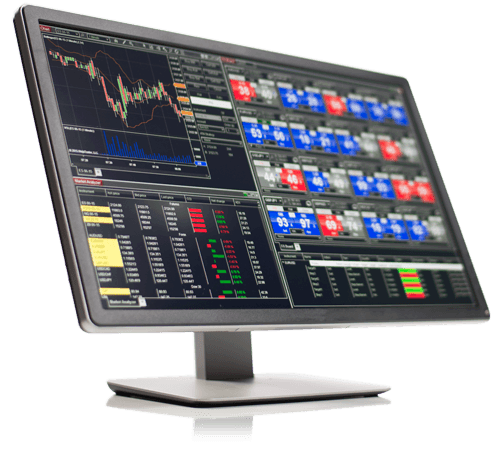
Our Recommended Trading Platform
NinjaTrader® is our #1 recommended trading platform, preferred by futures traders worldwide, including our clients.
Download NinjaTrader and receive free access to:
- Advanced futures charting
- Strategy development and backtesting
- Unlimited simulated trading
- 14-day trial of streaming live market data
NinjaTrader’s award-winning trading software provides advanced market analysis, professional charting and trading tools. Thousands of Apps and Add-Ons provide extensive customization for different trading workflows.
New traders can begin with simulated trading to learn the platform and practise their trading process before considering live-market trading.

Our Recommended Market Data Feed
Kinetick® provides real-time and historical end-of-day market data optimized for NinjaTrader.
Access market data for futures, foreign exchange and stock markets, with free end-of-day data available directly through the NinjaTrader platform.
Kinetick also provides subscription options for traders who require streaming real-time market data.
NinjaTrader
NinjaTrader Desktop flexible Windows-based for discretionary, hybrid and fully automated futures trading, suitable for day trading, swing trading, prop trading and live brokerage trading.
📈 Advanced Charting
Build configurable multi-chart and multi-timeframe workspaces with technical indicators, drawing tools and market-analysis features.
🧪 Simulation and Replay
Practise order entry, test trading plans and evaluate strategies in simulation before considering prop-firm or live-money trading.
⚙️ Strategy Development
Develop and backtest trading strategies using NinjaTrader’s strategy tools and C#-based NinjaScript development framework.
🖥️ Custom Workspaces
Organise charts, trading controls and market-analysis tools across one or multiple monitors and save the complete layout as a reusable workspace.
AlgoFuturesTrader for NinjaTrader 8
AlgoFuturesTrader—AFT—extends NinjaTrader Desktop with ATS hybrid trading systems, automated trade management, trading controls, technical indicators and progressive turnkey workspaces for simulator, prop-firm and live-brokerage trading.
AFT is purpose-built for NinjaTrader Desktop and supports progressive trading across the ATS Zero-to-Hero stages—from signals and automated exits through hybrid and fully automated trading.
👤 Discretionary Trading
The trader selects and enters each trade manually while using AFT indicators, signals and automated trade-management tools.
🧠 Hybrid Algo Trading
Combine trader-led decisions with algorithmic signals, semi-automated entries and adaptive automated trade management.
🤖 Fully Automated Trading
Test and operate rule-based automated entries and exits with configurable controls, risk settings and system baselines.
AFT Frequently Asked Questions
Does AlgoFuturesTrader require a trading platform?
Yes. AlgoFuturesTrader is a professional add-in developed specifically for NinjaTrader 8 Desktop. NinjaTrader must be installed and correctly configured before AFT can be installed and used.
Does AlgoFuturesTrader require a market-data connection?
Yes. AFT operates inside NinjaTrader and uses the market data available through the trader’s NinjaTrader connection. Real-time trading requires an appropriate real-time market-data connection, while simulation, Market Replay and backtesting can use the corresponding data available through NinjaTrader.
ATS does not provide the NinjaTrader platform, brokerage connection or underlying futures market-data service.
Does AlgoFuturesTrader require AlphaWebTrader?
No. AlgoFuturesTrader and AlphaWebTrader are separate products. AFT can operate independently inside NinjaTrader without AlphaWebTrader.
An optional AWT API Link can connect AlphaWebTrader Desktop to supported AFT8 modules and provide AWT market context to selected AFT indicator views.
Does AlgoFuturesTrader power AlphaWebTrader?
No. AlphaWebTrader is an independent cloud-based product and does not depend on AFT or NinjaTrader.
The optional API connection allows selected AWT information to be used inside AFT. It does not mean that AFT powers or supplies the underlying functionality of AlphaWebTrader.
Can AlgoFuturesTrader be used for simulation, prop-firm and live trading?
Yes. AFT operates exclusively inside NinjaTrader 8 Desktop and can be used across supported simulation, demo, prop-firm and live-brokerage trading environments.
- NinjaTrader Sim101 simulated trading
- NinjaTrader demo and eligible data-feed simulation accounts
- Market Replay and historical backtesting
- Prop-firm evaluation accounts
- Prop-firm simulated-funded and performance accounts
- Prop-firm live-funded accounts
- Personal live-brokerage accounts
Available features, instruments and trading modes depend on the selected AFT Freemium, trial, Essentials, Premium or Ultimate plan. Traders must confirm that their broker, connection provider or prop firm supports NinjaTrader and permits their intended discretionary, hybrid or fully automated trading method.
Get Started with NinjaTrader & (AFT)
Get Started with NinjaTrader and AlgoFuturesTrader (AFT) is very easy simply download the NinjaTarder platform, then register for an ATS Universal account and download the ATS Desktop apps and select your trade package
1) 📥 Download NinjaTrader
Create your NinjaTrader account, download NinjaTrader Desktop and begin exploring the platform through simulated trading.
📊 Get NinjaTrader FREE2) ⚙️ Install and Connect
Install NinjaTrader Desktop and connect an eligible simulation, prop-firm or live-brokerage account. Use NinjaTrader Help and Support for guidance with platform installation, configuration, market-data connections and supported accounts.
3) 🚀 Add AFT
Download and Install ATS Desktop apps, start NT and load the ATS turnkey workspaces. Traders can begin progressing through Zero-to-Hero...
🚀 Get Started TradingNinjaTrader Frequently Asked Questions
Is NinjaTrader Desktop free?
NinjaTrader Desktop is free for advanced charting, strategy backtesting and simulated trading. Streaming live market data may require a trial, eligible funded account or separate market-data subscription.
Does AlgoFuturesTrader require NinjaTrader Desktop?
Yes. AlgoFuturesTrader is installed into NinjaTrader 8 Desktop and requires an eligible AFT Freemium, trial, Essentials, Premium or Ultimate plan whenever its features are used.
Can ATS help install and configure NinjaTrader?
ATS provides self-guided setup resources covering the supported NinjaTrader settings required for AFT. Assistance with the NinjaTrader platform, brokerage account, market-data connection or platform installation should be requested directly from NinjaTrader Support.
Do I need a live brokerage account?
No. You can begin with NinjaTrader Sim101, a demo connection or an eligible data-feed simulation account. Use the ATS turnkey pathway to learn the platform and develop your trading process before considering prop-firm or live-brokerage trading.
Get Started with ATS
Get started with ATS hybrid trading systems, technology, Market insights, Zero-to-Hero education, support, trading groups, live-market AI Copilot analysis and Trade Mastery.
🚀 Get Started 100% Free 🦉 Discover ATS